本文将介绍在Android中如何使用include标签来更便捷地重用布局代码,从而减少冗余的Android代码。
在一个Android项目中我们可能会需要用到相同的布局设计,假如都写在一个xml文件中,代码显得很冗余,并且可读性也很差,所以我们可以把相同布局的代码单独写成一个模块,然后用到的时候可以通过<include /> 标签来重用layout代码。
app_title.xml:
< xml version="1.0" encoding="utf-8" >
<RelativeLayout android:id="@+id/titleLayout" android:layout_width="fill_parent" android:layout_height="wrap_content"
   android:background="@drawable/bt" xmlns:android="http://schemas.android.com/apk/res/android">

  <TextView android:text="@string/login" android:id="@+id/title" android:textSize="20px" android:textColor="@color/white"
   android:layout_width="wrap_content" android:layout_centerInParent="true" android:layout_height="wrap_content"/>
  <Button android:text="返回" android:id="@+id/refresh" android:layout_width="wrap_content" android:layout_height="wrap_content"
   android:layout_alignParentRight="true" android:focusable="false" android:textColor="@color/white"
   android:background="@drawable/okbutton" android:layout_marginRight="3px"/>
</RelativeLayout>
app_tradelogin.xml:
< xml version="1.0" encoding="utf-8" >
<!-- android:layout_below与 android:layout_above 是必须设置的,否则界面不规则,不设置android:layout_above本界面没有滑动效果-->
<ScrollView android:layout_below="@+id/titleLayout" android:layout_above="@+id/appbottom" android:layout_width="fill_parent"
  android:layout_height="fill_parent" android:layout_centerInParent="true" xmlns:android="http://schemas.android.com/apk/res/android">
 <LinearLayout android:id="@+id/theWholeLinearLayout" android:orientation="vertical" android:layout_width="fill_parent"
  android:layout_height="wrap_content" android:paddingLeft="10px" android:paddingTop="6px" android:paddingRight="10px" >
  <LinearLayout android:id="@+id/linearLayoutLeft" android:orientation="vertical" android:layout_width="fill_parent" android:layout_height="wrap_content">
   <TableLayout android:id="@+id/widget43" android:layout_width="fill_parent"
    android:layout_height="fill_parent" android:orientation="vertical"
    xmlns:android="http://schemas.android.com/apk/res/android" android:stretchColumns="1">
    <TableRow >
    <!--  引用定义好的TextView样式,假如这里的属性和样式里定义的属性重复,则这里会替换样式里定义的属性-->
     <TextView android:id="@+id/traderName" android:text="@string/traderName" style="@style/StyleTextInfo1" mce_style="@style/StyleTextInfo1"/>
     <Spinner android:id="@+id/traderNameS" android:layout_width="fill_parent" android:layout_height="wrap_content">
     </Spinner>
    </TableRow>

    <TableRow>
     <TextView android:id="@+id/departName" android:text="@string/departName" style="@style/StyleTextInfo1" mce_style="@style/StyleTextInfo1"/>
     <Spinner android:id="@+id/departNameS" android:layout_width="fill_parent" android:layout_height="wrap_content"/>
    </TableRow>

    <TableRow >
     <TextView android:id="@+id/strComponyName" android:text="@string/accType" style="@style/StyleTextInfo1" mce_style="@style/StyleTextInfo1"/>
     <Spinner android:id="@+id/accTyte" android:layout_width="fill_parent" android:layout_height="wrap_content"/>
    </TableRow>

    <TableRow >
     <TextView android:id="@+id/strUserAcc" android:text="@string/userAcc" style="@style/StyleTextInfo1" mce_style="@style/StyleTextInfo1"/>
     <EditText android:id="@+id/accEditText" android:text="" android:numeric="decimal" style="@style/StyleEditText1" mce_style="@style/StyleEditText1"/>
    </TableRow>

    <TableRow >
     <TextView android:id="@+id/userPwd" android:text="@string/userPWD" style="@style/StyleTextInfo1" mce_style="@style/StyleTextInfo1"/>
     <EditText android:id="@+id/userPwdET" android:text="" android:password="true" style="@style/StyleEditText1" mce_style="@style/StyleEditText1"/>
    </TableRow>

    <TableRow >
     <TextView android:id="@+id/commPwd" android:text="@string/commPWD" style="@style/StyleTextInfo1" mce_style="@style/StyleTextInfo1"/>
     <EditText android:id="@+id/commPwdET" android:text="" android:password="true" style="@style/StyleEditText1" mce_style="@style/StyleEditText1"/>
    </TableRow>
   </TableLayout>
  </LinearLayout>

  <LinearLayout android:orientation="vertical" android:layout_width="fill_parent" android:layout_height="wrap_content">

    <LinearLayout android:id="@+id/linearLayoutTab1" android:layout_height="wrap_content"
     android:layout_width="fill_parent" android:orientation="horizontal">

     <LinearLayout android:id="@+id/linearLayoutTab2" android:layout_height="wrap_content"
      android:layout_width="fill_parent" android:orientation="horizontal" android:layout_weight="1">
      <CheckBox android:id="@+id/recordAcc"  android:layout_width="wrap_content" android:layout_height="wrap_content"/>
      <TextView android:id="@+id/commPwd" android:text="@string/saveUserAcc" style="@style/StyleTextInfo1" mce_style="@style/StyleTextInfo1"/>
     </LinearLayout>
     <LinearLayout android:id="@+id/linearLayoutTab2" android:layout_height="wrap_content"
      android:layout_width="fill_parent" android:orientation="horizontal" android:layout_weight="1">

      <CheckBox android:id="@+id/hideAcc" android:layout_width="wrap_content" android:layout_height="wrap_content"/>
      <TextView android:id="@+id/commPwd" android:text="@string/ycUserAcc" style="@style/StyleTextInfo1" mce_style="@style/StyleTextInfo1"/>
     </LinearLayout>
    </LinearLayout>

   <LinearLayout android:id="@+id/linearLayoutTab1" android:layout_height="wrap_content"
     android:layout_width="fill_parent" android:orientation="horizontal">

     <LinearLayout android:layout_width="220px" android:layout_height="wrap_content" android:orientation="horizontal"
      android:gravity="center">

              <Button android:id="@+id/confirmexch" android:gravity="center" android:layout_width="wrap_content"
         android:layout_height="50px" android:textSize="22dp" android:text="@string/login" android:layout_weight="1"
         android:focusable="false" android:textColor="@color/white" android:background="@drawable/buttonl"/>
     </LinearLayout>

     <LinearLayout android:id="@+id/linearLayoutTab" android:layout_height="wrap_content"
      android:layout_width="fill_parent" android:gravity="center">
      <ImageView android:layout_width="wrap_content" android:layout_height="50px" android:id="@+id/myImage"/>
     </LinearLayout>
  </LinearLayout>
 </LinearLayout>
 </LinearLayout>
</ScrollView>
app_bottom.xml:
< xml version="1.0" encoding="utf-8" >
<LinearLayout android:id="@+id/appbottom" android:orientation="vertical" android:layout_width="fill_parent"
  android:layout_height="wrap_content" android:layout_alignParentBottom="true"
  xmlns:android="http://schemas.android.com/apk/res/android">

 <LinearLayout android:orientation="horizontal" android:layout_width="fill_parent"
  android:layout_height="wrap_content" android:background="@drawable/light">
  <ImageView  android:id="@+id/about" android:layout_width="30px" android:layout_height="wrap_content" android:src="@drawable/ttt"
    android:layout_alignParentLeft="true"/>
  <TextView android:id="@+id/light" android:layout_width="fill_parent" android:layout_height="wrap_content" android:textColor="@color/black"/>
 </LinearLayout>

 <LinearLayout android:orientation="horizontal" android:layout_width="fill_parent"
  android:layout_height="wrap_content" android:background="@drawable/mainmenu">
  <Button android:id="@+id/quotButton" android:layout_weight="1" android:layout_width="52px" android:layout_height="wrap_content"
   android:textColor="@color/white" android:text="" android:background="@drawable/button1"/>

  <Button android:id="@+id/entrustButton" android:layout_weight="1" android:layout_width="52px" android:layout_height="wrap_content"
   android:textColor="@color/white" android:text="" android:background="@drawable/button1"/>
  <Button android:id="@+id/queryButton" android:layout_weight="1" android:layout_width="52px" android:layout_height="wrap_content"
   android:textColor="@color/white" android:text="" android:background="@drawable/button1"/>

  <Button android:id="@+id/yinZhengButton" android:layout_weight="1" android:layout_width="52px" android:layout_height="wrap_content"
   android:textColor="@color/white" android:text="" android:background="@drawable/button1"/>

  <Button android:id="@+id/recordButton" android:layout_weight="1" android:layout_width="52px" android:layout_height="wrap_content"
   android:textColor="@color/white" android:text="" android:background="@drawable/button1"/>

  <Button android:id="@+id/logoutButton" android:layout_weight="1" android:layout_width="52px" android:layout_height="wrap_content"
   android:textColor="@color/white" android:text="" android:background="@drawable/button1"/>
 </LinearLayout>
</LinearLayout>
tradelogin_portrait.xml:
< xml version="1.0" encoding="utf-8" >
<RelativeLayout android:layout_width="fill_parent" android:layout_height="fill_parent" style="@style/StyleLayoutMain" mce_style="@style/StyleLayoutMain"
 xmlns:android="http://schemas.android.com/apk/res/android">

 <!-- include标签内不能设置RelativeLayout属性,如android:layout_alignParentBottom,因为不起作用 -->
 <!-- include标签内设置id属性后(android:id),其引用的布局layout内的id属性就不起作用了,怀疑是其引用的layout外层包裹了一层include标签
  或者是覆盖了其内的属性id-->
 <!-- 假如没有include标签,所有布局代码都写在一个xml文件中,界面会显得很冗余,可读性很差。而且界面加载的时候是按照顺序加载的,前面的布局不能
  调用其后面的布局id。而采用include后,一个include中可以引用其后的include中的布局id属性 -->
 <include android:id="@id/titleLayout" layout="@layout/app_title" />
 <include layout="@layout/app_tradelogin"/>

 <include layout="@layout/app_bottom"/>

</RelativeLayout>
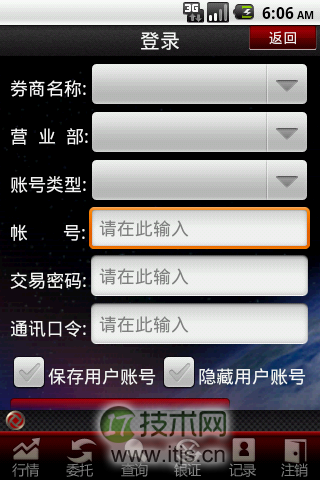
效果如下: